Boldo Bioma · Web app
Alinha
Production schedules that the whole team, and the client, can follow.
WebMacIn BiomaIn Claude
What it does
The client followsthrough a link
Alinha is where Boldo plans every production. A producer turns the client's brief into a workback: every stage, client review and delivery, counted in business days from the delivery date, with stage durations measured on real projects.
Then the producer refines it in a spreadsheet-like list or on a Gantt chart, publishes it as a version and makes it live. The client follows it through a link, without an account, always at the same address. The team starts each day on Today: what is late, what is due and what is waiting on the client.
Who uses it
Boldo's producers and team. Clients only see the schedules shared with them, through a link.
The screens
01 / 06
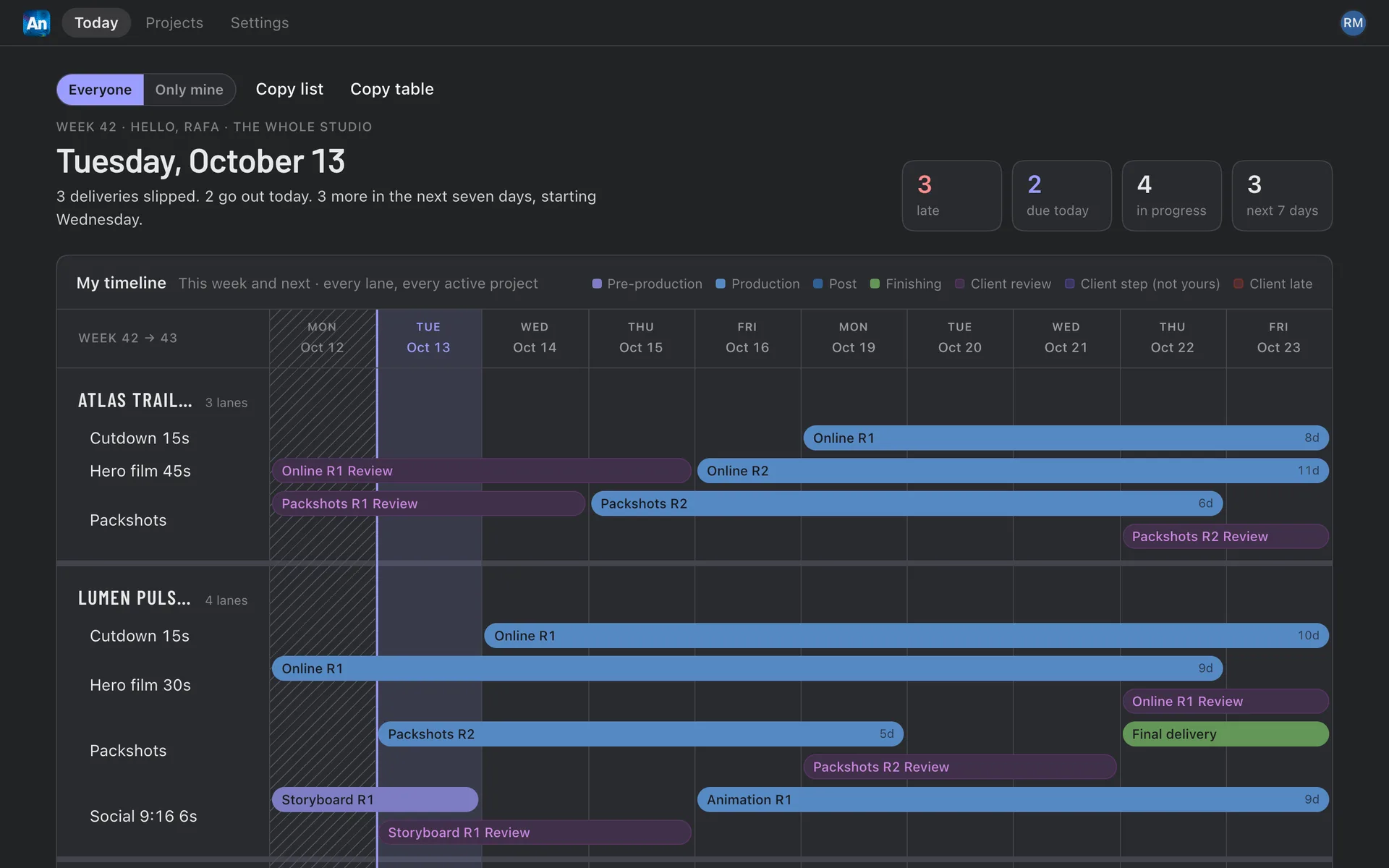
Screens with demo data, from made-up clients.
In six stepsHow it works
- 01Start a projectPick the client, name the project and paste the brief. The brief stays with the project.
- 02Build the workbackChoose a template and the delivery date. Alinha lays out every stage and tells you whether it fits or by how many days it overruns.
- 03RefineEdit inline in the list or drag bars on the Gantt. Assign people, set statuses and move dates. ⌘Z undoes.
- 04PublishFreeze the plan as v1, v2… and choose which version the client sees. Internal items are stripped out first.
- 05ShareSend the client a link, with or without a password, with an expiry date and only the pages you choose.
- 06FollowToday shows what is late, what is due and what is waiting on the client. Every change is recorded.
What’s inside
Features
Workback
Templates of measured stages, with standard, tight and minimum durations, and the days to spare or the overrun.
List and Gantt
Edit like a spreadsheet or drag the bars. Reviews and feedback stay linked, with their history.
Versions
Publish v1, v2… and pick the live one. Compare any two and copy a summary of what changed.
Client links
Impossible to guess, with an optional password and expiry, and revocable at once.
Assets checklist
What the client owes and when. The client marks what has been sent.
Today
Late, due today, in progress, next 7 days and what is waiting on the client.
Delays and replanning
Register a delay with its owner, reason and evidence. Shift a lane or the whole project.
Business days
Brazilian holidays, company days off and time off, so every date lands on a working day.
Email digests
Optional morning and weekly summaries for the team. Never sent to clients.
Claude connector
Ask about a schedule or have Claude build a workback. Publishing and sharing stay with people.
Where it runs
Web
alinha.boldo.ag, in any modern browser, light or dark.
Mac
Shows late items on the Dock, sends notifications and updates itself.
Inside Bioma
Alinha's Today page lives on Bioma's side rail, with a badge for late items.
Claude
A connector (MCP) that never goes beyond your role.
Security
You sign in with your Boldo Account (password plus a second step). Your role is checked again every 10 minutes.
Clients only see what was published. Internal items, who is assigned, delay reasons and internal notes are removed before a version goes out.
Client links use a random 12-character code. Passwords are stored as hashes, with 5 tries every 15 minutes.
The Claude connector reads and plans within your role, but it cannot publish versions or create links.
Alinha does not access data from Google accounts.